Player ESP controls
Skeleton
Lines along the player model showing pose and stance.
Head Circle
A small mark on the head for manual aim when the aimbot is off.
Box
A 2D outline around each player.
Distance
Meters to each labeled player.
Name
The player name on the label.
Team Number
Team index so mixed fights are easier to read.
Weapon
The weapon the player is holding right now.
View Direction
Shows where the player is looking.
Health Bar
Remaining health beside each player.
Snaplines
Lines from a screen anchor to each player.
Show Knocked
Whether downed players still get labels.
Helmet Name
Helmet item name when the game exposes it.
Helmet Level
Helmet tier when available.
Armor Name
Armor item name when exposed.
Armor Level
Armor tier when available.
Chest Bag Name
Chest rig or bag name when exposed.
Chest Bag Level
Chest rig or bag tier when available.
Hero Name
Operator or hero name when the game shows it.
Max Distance
Caps how far player labels draw.
Custom Colors / ESP Size / Transparency / Brightness
Global styling controls for player ESP readability.
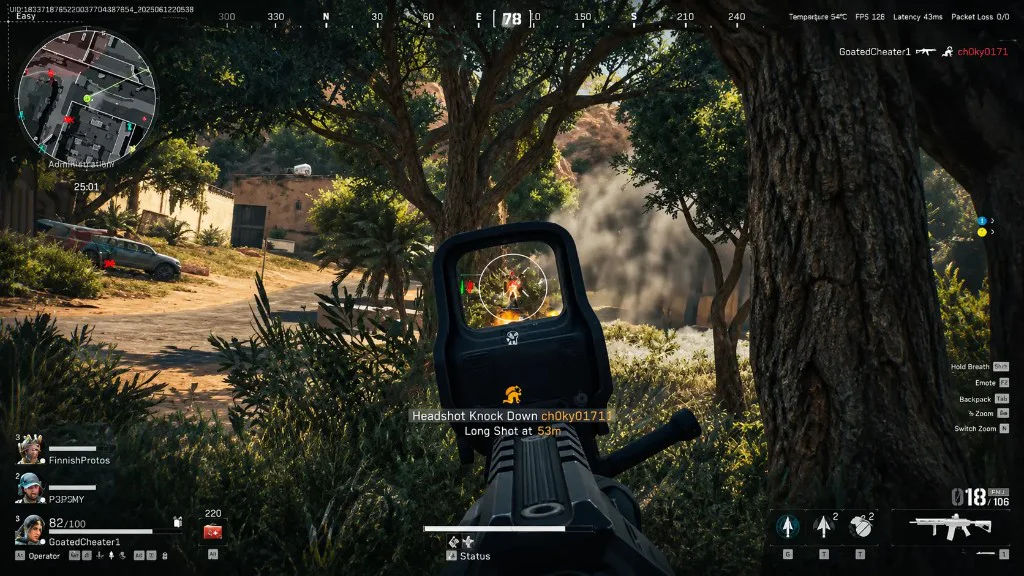
Gear labels matter in Delta Force
Helmet, armor, and chest bag readouts answer whether a push is worth it before you commit. Pair them with distance and health so you are not guessing at range.
Hero name and team number help on mixed squads. Turn off labels you do not read so the screen stays calm during CQB.
Wallhack without one master switch
Search traffic calls this a wallhack. On this menu it is separate toggles: box, skeleton, snaplines, and the gear lines above. Max distance keeps far contacts from cluttering wide maps.
What player ESP does not include
Loot on the ground, computers, and corpses belong to loot ESP, not player labels. Vehicles are not part of this module on the published list.
Works well with
Related guides
Related reading
Delta Force Player ESP questions
Is Delta Force player ESP the same as a wallhack?
Yes, that is the usual name. You get separate switches for box, skeleton, gear readouts, and the rest.
Does player ESP show loot?
No. Ground loot, corpses, and computers are in loot ESP.
What does max distance change?
How far player labels draw. Loot ESP has its own filters.
Player ESP ships with the full menu
One license covers every module. Monthly is $35 for 31 days. Lifetime is $150.
Around the site
Status, checkout, and the guides that sit around this module.